

 Home
HomeWith Turnkey, you can build a platform that distributes embedded wallets to your own customers. Your platform abstracts Turnkey behind your own SDK, APIs, or UI components. A 2-of-2 root quorum model gives your platform co-signing authority over every transaction, enabling billing gates, compliance checks, and risk controls at the infrastructure layer, while end users remain non-custodial.Documentation Index
Fetch the complete documentation index at: https://turnkey-0e7c1f5b-graham-docs-revamp.mintlify.app/llms.txt
Use this file to discover all available pages before exploring further.
Powered by Turnkey
- DIMO — decentralized transportation network with 165,000+ connected vehicles. 90% reduction in onboarding time, 30% increase in completion rates. Built their own transactions SDK on Turnkey’s infrastructure
What makes Wallet-as-a-Service different
With consumer wallets and business wallets, your application integrates Turnkey directly and manages wallets for end users. With Wallet-as-a-Service, your platform is an intermediary layer: you build wallet infrastructure on top of Turnkey, and your customers integrate with your SDK rather than Turnkey directly. The defining pattern is the 2-of-2 root quorum. Both the end user and your platform must approve every fund-moving transaction. The end user authenticates via passkey (or equivalent), then your platform evaluates its own rules (billing status, compliance, risk) before co-signing. If either party withholds approval, the transaction does not execute. No transaction executes without the end user’s authentication. End users remain non-custodial because they can always export their keys independently, without platform approval.When to use Wallet-as-a-Service
| Scenario | Why Wallet-as-a-Service fits |
|---|---|
| Your customers embed wallets through your SDK, not Turnkey’s | You own the developer experience end-to-end. Downstream integrators never interact with Turnkey directly. |
| You need platform-level co-signing on every transaction | 2-of-2 root quorum lets your platform enforce billing gates, compliance checks, or risk controls before any fund-moving transaction. |
| You want to white-label wallet infrastructure | Fork or wrap the Embedded Wallet Kit with your branding and expose your own APIs. Turnkey is invisible to your customers. |
Architecture
Each end user maps to a Turnkey sub-organization. The sub-org contains the user’s wallets, credentials, policies, and activity logs, fully isolated from other users and from your platform’s management layer.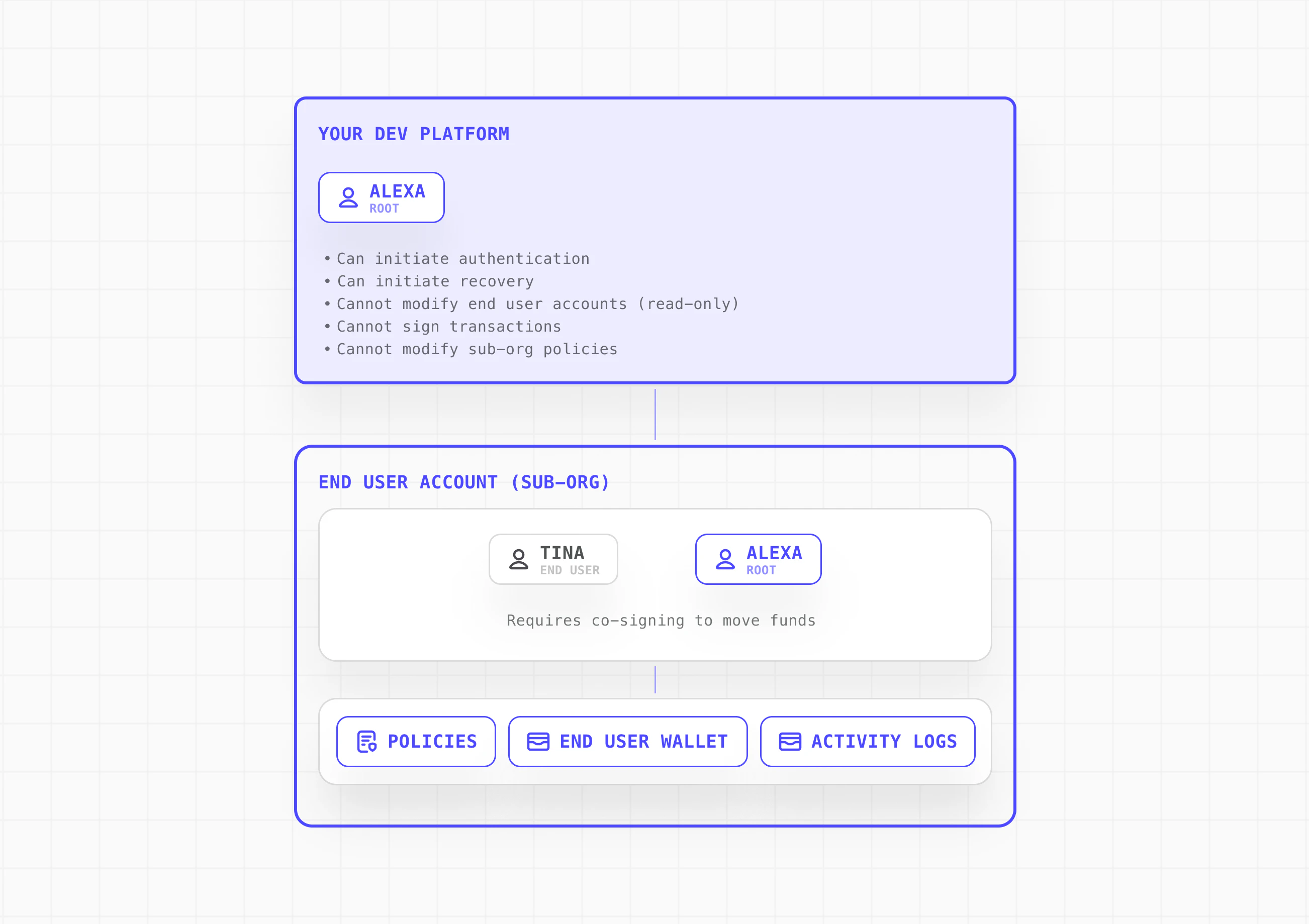
Transaction authorization flow
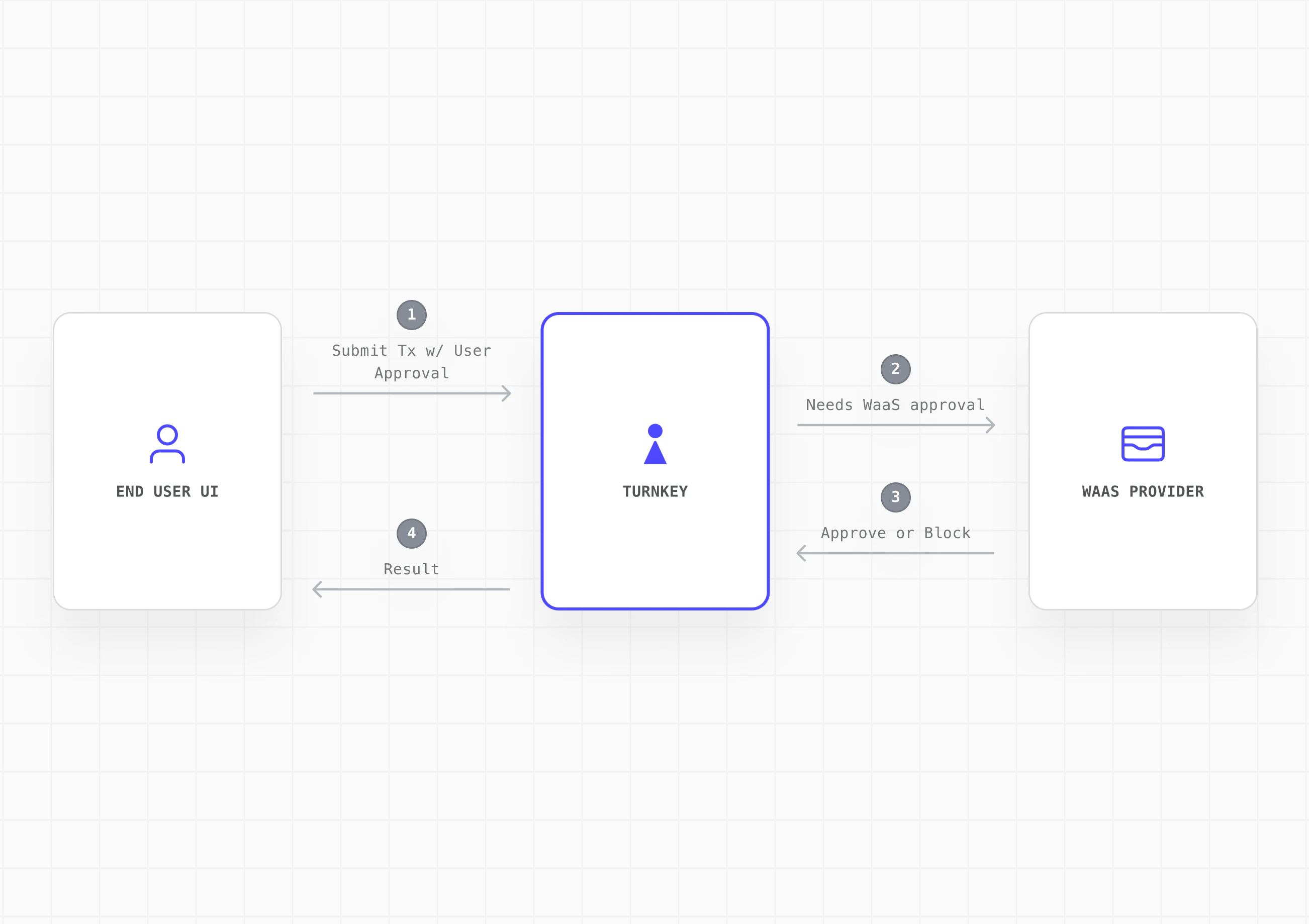
- End user initiates a transaction from your embedded wallet UI
- End user approves via their authenticator (e.g. passkey). Turnkey records the activity as partially approved
- Your platform evaluates on its backend: billing status, risk/compliance rules, and any other checks
- Your platform approves via API key and the transaction executes
- If the platform withholds approval, the transaction does not execute
Implementation
Step 1: Define the tenant model
Map each end user to a sub-organization. One sub-org per end user.- Isolated tenants: Each sub-org is a self-contained data boundary with wallets, policies, authenticators, and activity logs fully isolated from one another.
- Scoped parent org permissions: Your parent organization has read-only access to sub-orgs and can initiate auth and recovery flows, but cannot sign transactions or modify policies within them.
- External mapping: Track the relationship between your platform’s user IDs and their corresponding Turnkey sub-org IDs in your own database.
Step 2: Design the sub-organization control model
Define what lives inside each sub-org and how control is shared between your platform and the end user.- End user (root): Authenticated via passkey or equivalent user-controlled authenticator.
- Platform provider (root): Authenticated via API key. Used to approve or block transactions based on your service rules.
- Delegated access (optional): For automation or backend-initiated workflows, add a scoped non-root API key via Delegated Access. This must be tightly policy-scoped and should never have broad signing authority or bypass user consent.
Step 3: Create sub-org with wallet and export policy
Specify what gets created in every sub-org by default: wallet structure, supported chains/accounts, and baseline policies. For the 2-of-2 quorum model, establish the threshold last so your platform can configure policies (including export) with only your platform’s approval. Once the 2-of-2 quorum is established, the end user can trigger exports via the export policy without needing your platform’s co-signature. This keeps the co-managed model non-custodial: end users can always export their keys and access their funds directly, independent of your platform.| Step | Action | Quorum State |
|---|---|---|
| 3a | Create sub-org with both root users + wallet | 1-of-2 |
| 3b | Create export policy for end user | 1-of-2 |
| 3c | Update threshold to 2 | 2-of-2 |
Step 4: Build your integration surface
Create the SDK, APIs, or UI components that downstream developers will integrate with. Abstract Turnkey and expose only your platform’s intended wallet, auth, and signing flows.- Embedded Wallet Kit (EWK): Fork or wrap EWK components (authentication, wallet UI, approval prompts) with your branding. Surface “pending platform approval” states in the transaction flow.
- Backend service: Handle platform root approvals (via API key), billing and risk evaluation, and activity monitoring through your backend.
- SDK abstraction layer: Wrap Turnkey’s SDK calls behind your own interface for full control over the developer experience.
Step 5: Wire the wallet into your platform flow
Integrate the wallet into your onboarding and runtime flows so every downstream integration inherits a working embedded wallet.- Onboarding: Handle Turnkey org setup, auth configuration, and the staged sub-org creation flow as part of user registration. The end user should experience passkey registration as a natural part of sign-up.
- Client initialization: Initialize the Turnkey client with the user’s sub-org context on each session. Use sessions for batched signing workflows to reduce authentication friction.
- Transaction flow: Surface the approval prompt via EWK components, submit the user’s approval to Turnkey, run your backend checks, then co-sign or withhold.
- Recovery: Expose the export flow in your settings UI so users can self-serve wallet recovery. Turnkey’s enclave encrypts the mnemonic to a user-generated target key via HPKE. Neither Turnkey nor your platform can view the exported material.