

 Home
HomeDocumentation Index
Fetch the complete documentation index at: https://turnkey-0e7c1f5b-graham-docs-revamp.mintlify.app/llms.txt
Use this file to discover all available pages before exploring further.
What are embedded wallets?
An embedded wallet is a crypto wallet built directly into your application. Instead of asking users to install a browser extension or manage seed phrases, your app handles wallet creation, authentication, and signing behind the scenes. Users interact with your product; the wallet is infrastructure they never have to think about.Why Turnkey for embedded wallets?
Building embedded wallets from scratch means solving key management, multi-chain signing, authentication, custody models, and policy controls, all without exposing private keys. Turnkey handles this infrastructure so you can focus on your product. With Turnkey, you can:- Authenticate users via email, phone number, biometrics, social logins, or passkeys
- Create and manage wallets across multiple chains
- Configure custodial, non-custodial, or hybrid custody models
- Control signing permissions with a programmable policy engine
- Sponsor gas so users never need native tokens
- Leverage pre-built UI components or build fully custom experiences
- Import and export keys to support user sovereignty
How it works
User authentication flows into a signed request to Turnkey. Inside the secure enclave, the policy engine evaluates the request; key derivation and signing follow, and only the signature is returned. Your app can then broadcast the transaction through another provider or with Turnkey Transaction Management.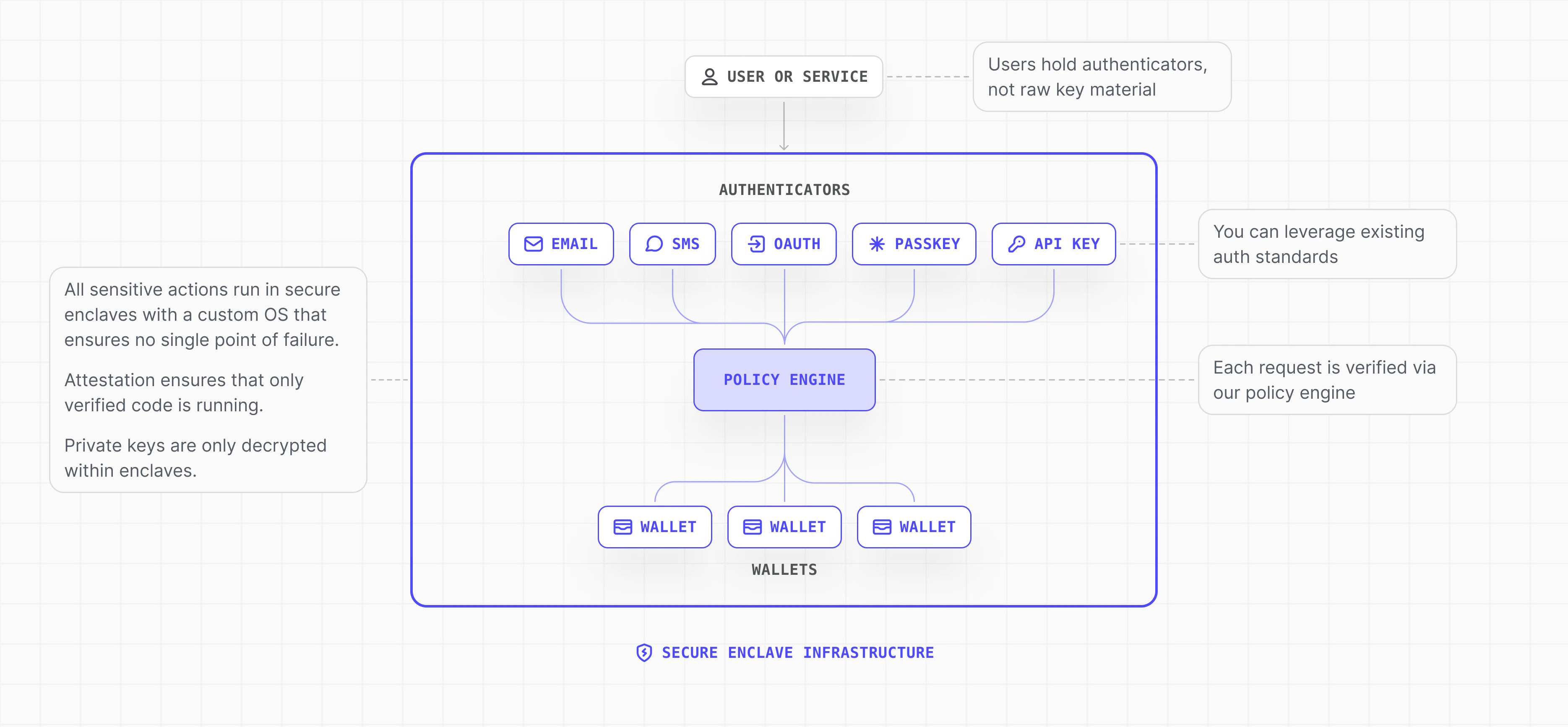
Custody models
We recommend creating a Turnkey sub-organization for each end user. This gives every user a fully isolated environment with their own wallets, credentials, and policies. Private keys in Turnkey never leave the secure enclave. Custody is determined by who holds the credentials that can authorize the enclave to sign.- Non-custodial: The user is the sole party with signing authority. Only their authenticator (passkey, email, biometric) can authorize the enclave to produce a signature. Users can export their keys to access assets independently of your application.
- Custodial: Your application holds signing authority (via API key) and can authorize transactions without per-action user approval. Common for automated workflows like trading or subscription payments.
- Hybrid: Both the user and your application hold credentials, but policies define what each party can authorize. For example, the user controls asset transfers while your app handles gas sponsorship or scheduled operations.
Security model
- Keys never leave the enclave. Private keys live in Trusted Execution Environments (TEEs). All derivation and signing happen inside verifiable infrastructure; only signatures are returned.
- Authenticator-bound requests. Every sensitive operation is signed by a user-held authenticator (passkey, email, etc.). The enclave verifies the signature before performing the operation. See Authentication Overview.
- Scoped, programmable control. Choose non-custodial, hybrid, or app-controlled custody. Policies and sub-organization isolation limit who can sign what.
- Trusted vs. untrusted separation. Verification and execution run only inside secure enclaves. A breach of your app or backend does not expose keys or signing capability.
Building with Turnkey
For React applications, the Embedded Wallet Kit (EWK) is the recommended starting point. It provides pre-built auth and wallet UI components, a hook-based API, and requires no backend. It is the most opinionated path, designed to get you to a working embedded wallet with minimal configuration. Turnkey also provides SDKs for React Native, Swift, Kotlin, and Flutter. For fully custom implementations, you can call the Turnkey API directly. See the Integration Guide to start building, or the SDK Reference for detailed method documentation.Use cases
Embedded wallets serve different needs depending on who holds the wallet and how it’s operated. Choose the pattern that matches what you’re building.Ready to build?
- Quickstart — explore the live demo, clone a starter app, or jump straight into building
- Integration Guide — step-by-step guides for React, React Native, Flutter, Swift, and Kotlin
- Documentation — dig into the underlying concepts: auth, wallets, policies, and more