

 Home
HomeYou’ve seen what Turnkey’s embedded wallets can do. This page covers the concepts and architectural decisions that apply across all platforms before you dive into the platform-specific guides.Documentation Index
Fetch the complete documentation index at: https://turnkey-0e7c1f5b-graham-docs-revamp.mintlify.app/llms.txt
Use this file to discover all available pages before exploring further.
Choose your SDK
Turnkey provides SDKs at different levels of abstraction. The right choice depends on your platform and how much you want pre-built for you.React
Pre-built UI components, hook-based API, and no backend required. Recommended for React and
Next.js apps.
React Native
The mobile counterpart to the React wallet kit, optimized for mobile-native flows.
TypeScript
The underlying TypeScript SDK. Best for Angular, Vue, Svelte, or any web framework where the
React Wallet Kit doesn’t apply.
Flutter
Dart SDK — Cross-platform iOS and Android support.
Swift
Swift SDK — Native iOS integration.
Kotlin
Kotlin SDK — Native Android integration.
Direct API
Call the Turnkey REST API directly from any language.
How integrations are structured
Every Turnkey embedded wallet integration is built around the same model: one sub-organization per user. Your account is the parent organization. Each end user gets their own sub-organization — a fully isolated environment with its own wallets, credentials, and policies. Isolation is strict: credentials in one sub-org cannot authorize actions in another.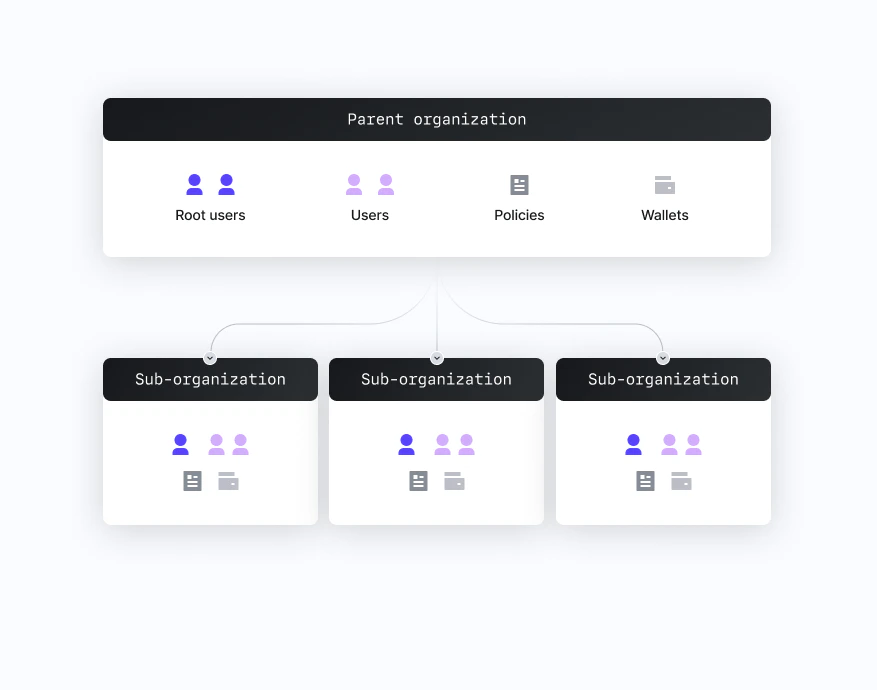
The Auth Proxy
Creating a sub-organization and initiating email/SMS OTP flows require a request stamped by your root organization’s API key. Traditionally this means hosting a backend. The Auth Proxy is Turnkey’s managed backend for these operations. Enable it in the dashboard, configure your allowed origins and auth methods, and your frontend can callhttps://authproxy.turnkey.com directly — no server needed on your end.
Use the Auth Proxy when...
- You want to ship without standing up a backend
- You’re using the React or React Native Wallet Kit (they’re designed around it)
- Your auth flows are OTP, OAuth, and new-user signup
Use your own backend when...
- You already run a backend and want to keep signing logic there
- You need flows the Auth Proxy doesn’t cover
- You need full control over request construction and error handling
How request signing works
Every write to Turnkey — creating a wallet, signing a transaction, updating a policy — is an activity. Activities must be stamped (cryptographically signed) by an authorized credential before the enclave will execute them. The typical flow for a user-initiated action:User authenticates
The user completes an auth flow (passkey prompt, OTP code, OAuth). The SDK stores a session
credential — a short-lived signing key — in the device’s secure storage.
SDK stamps the request
When your app calls an SDK method (e.g.,
createWallet, signTransaction), the SDK constructs
the activity payload and signs it with the session credential.Sessions
Sessions control how long a user stays authenticated without re-prompting. The SDK stores the session credential in device-native secure storage (IndexedDB in browsers, SecureStorage on mobile) and renews it automatically when possible. Default session length is 15 minutes, configurable per flow. If a session expires, the SDK surfaces an unauthenticated state and your app prompts re-auth. See Sessions for configuration options.What the platform guides cover
Each platform guide walks through the full integration lifecycle:- Installing and configuring the SDK
- Auth flows: passkeys, email/SMS OTP, and OAuth (Google, Apple, etc.)
- Creating wallets and deriving addresses
- Signing transactions
- Advanced topics: custom sub-org configuration, backend-authenticated flows, import/export