

 Home
HomeBack up wallets on Turnkey and recover them when you need to for incident response, provider migration, and redundancy. All key material is encrypted directly to Turnkey’s secure enclave using HPKE, and every recovery operation is cryptographically stamped. For an overview of Turnkey’s key management capabilities, see the Key Management Overview.Documentation Index
Fetch the complete documentation index at: https://turnkey-0e7c1f5b-graham-docs-revamp.mintlify.app/llms.txt
Use this file to discover all available pages before exploring further.
Key implementation decisions
| Decision | What to consider | Learn more |
|---|---|---|
| Organization setup | Create dedicated recovery users with limited permissions. Distribute authenticators (passkeys, YubiKeys) across geographic locations where possible. | Organizations |
| Root quorum | Require multiple approvers for sensitive operations to prevent any single credential compromise from triggering unauthorized recovery. | Root Quorum |
| Recovery policies | Restrict what can be done with recovered wallets: limit fund movement to allowed addresses, require multi-party approval, scope signing by chain or value. | Policy Engine, Signing Control |
| Import method | Use the NodeJS server SDK for the full import flow including encryption and secure transport, or the React Wallet Kit for client-side import. | Import Wallets, SDK Server |
Example: treasury recovery
Import wallet keys into Turnkey’s secure enclave ahead of time. If a key holder becomes unavailable or a hardware wallet fails, recover treasury assets with quorum-controlled access and policy-restricted fund movement.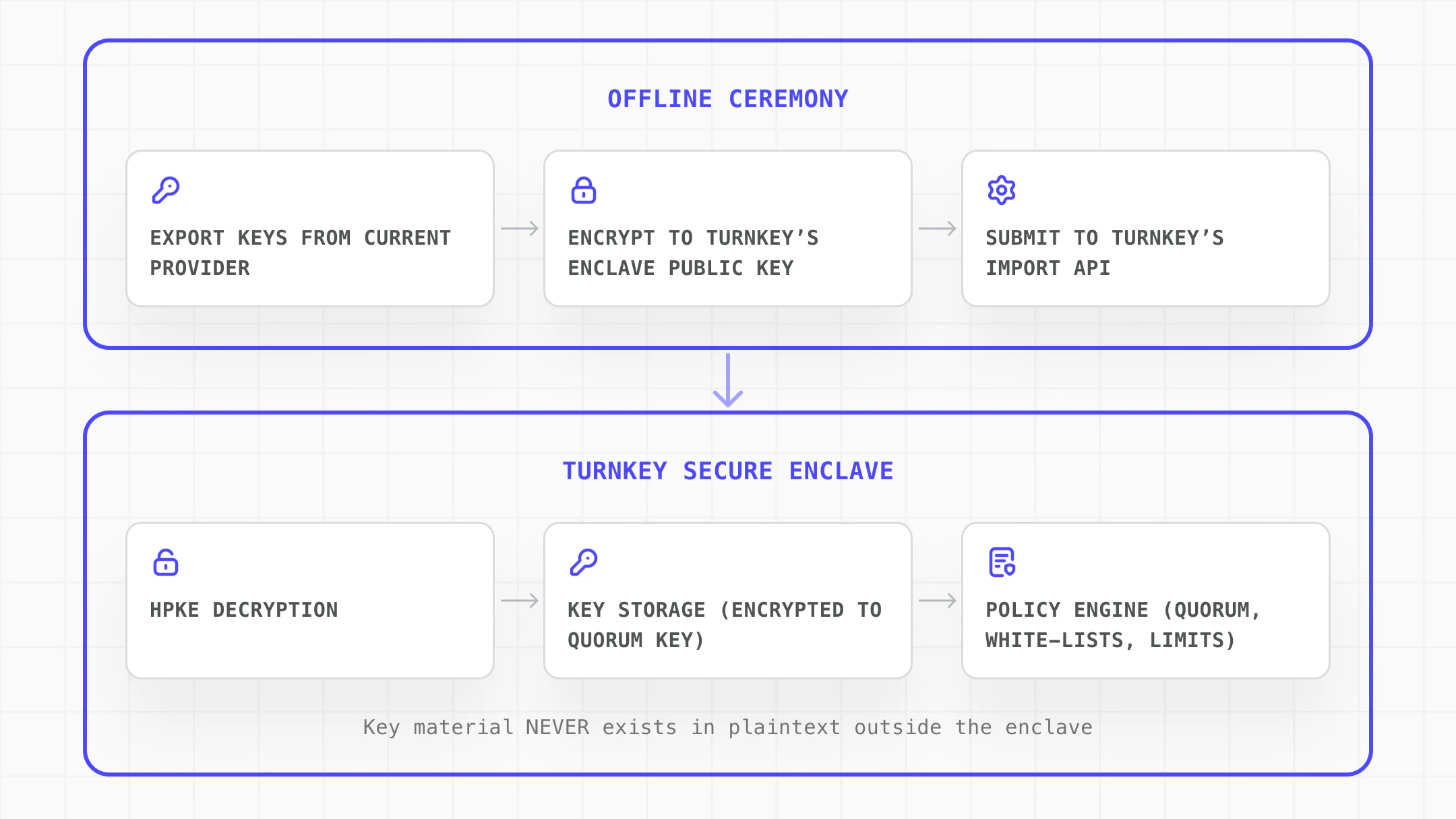
| Need | How Turnkey solves it |
|---|---|
| Import keys with no plaintext exposure in transit | All key material is encrypted directly to the enclave using HPKE. Plaintext never exists outside the enclave boundary. |
| No single person can unilaterally move recovered funds | Quorum approval requires multiple approvers for sensitive operations |
| Restrict what can be done with recovered wallets | Policies scope fund movement to allowed addresses, chains, and value thresholds |
| Cryptographic audit trail | Every recovery operation is cryptographically stamped, ensuring recoveries cannot be tampered with |
| Secondary signing path must always be available | Import backup copies of critical wallet keys so operations continue if a primary signer goes down |
Implementation steps
Explore the complete implementation in the GitHub disaster-recovery example.
Set up organization and recovery policies
Create a Turnkey organization and establish the security foundation for recovery operations:
- Create dedicated recovery users with specific, limited permissions
- Configure the Root Quorum to require multiple approvers for sensitive operations
- Distribute authenticators (passkeys, YubiKeys) across geographic locations
- Define policies that restrict what can be done with recovered wallets
Initialize and encrypt the wallet bundle
Use the NodeJS server SDK to initialize the import and encrypt the wallet material to Turnkey’s enclave:
Import the wallet
Use importWallet() to transmit the encrypted bundle. The enclave decrypts and stores the key material. All fund movements are logged with cryptographic signatures.